CS 180  ·  Intro to Computer Vision & Computational Photography  ·  Fall 2026  ·  Reun-Shaun Shieh

Project 0  ·  Reun-Shaun Shieh  ·  due September 1, 2026

Becoming Friends with Your Camera

Three exercises in what a camera actually does to space. Two of them are pure photography: move the camera, keep the subject the same size on the sensor, and watch the geometry change. The third is the Vertigo shot — and rather than physically dollying, I photographed a matched pair of frames and rebuilt the entire sweep from scratch: my own feature detector, my own RANSAC homography, my own perspective warp. The whole thing is then ported to JavaScript below — not just the renderer, the entire pipeline — so you can drag the dolly yourself, and run the effect on a pair of photographs of your own without leaving the page.

Part 1

The selfie, the wrong way and the right way

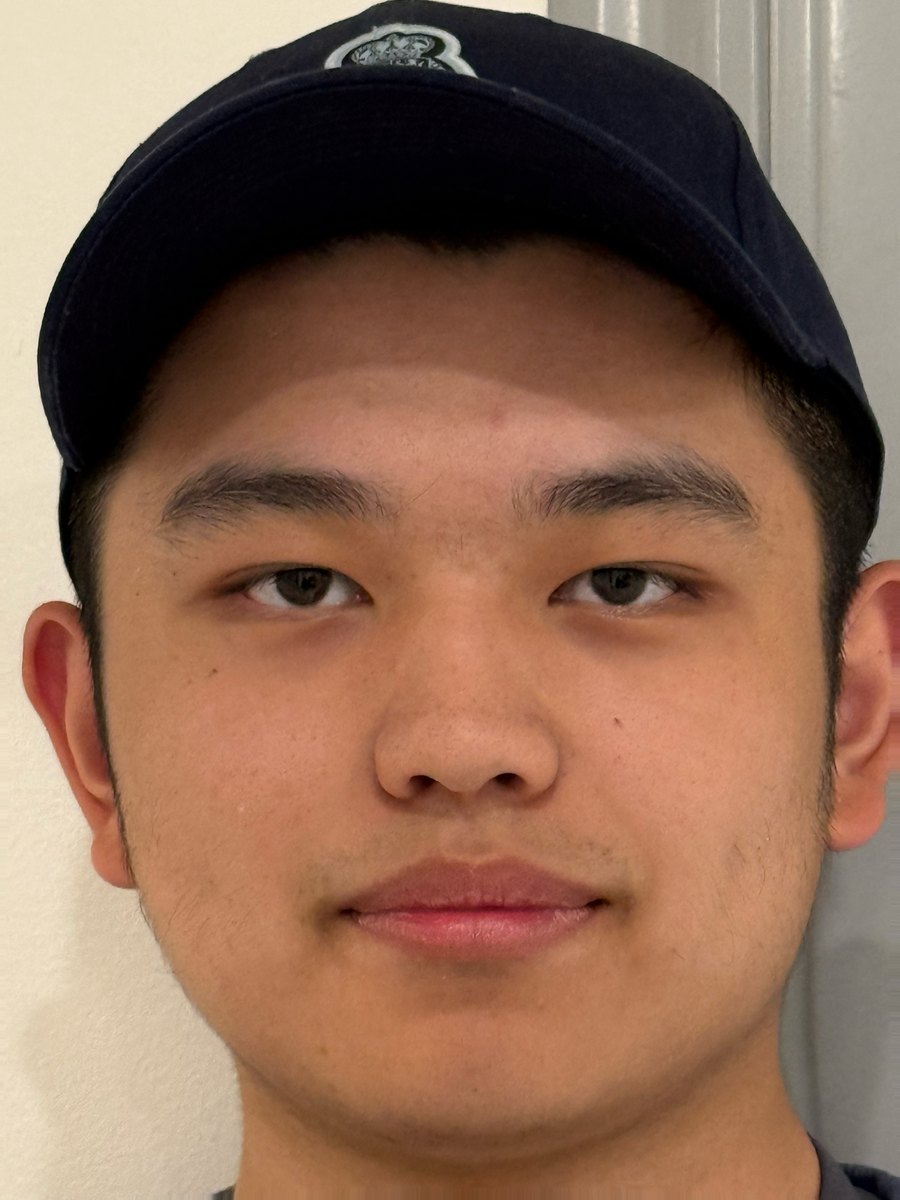
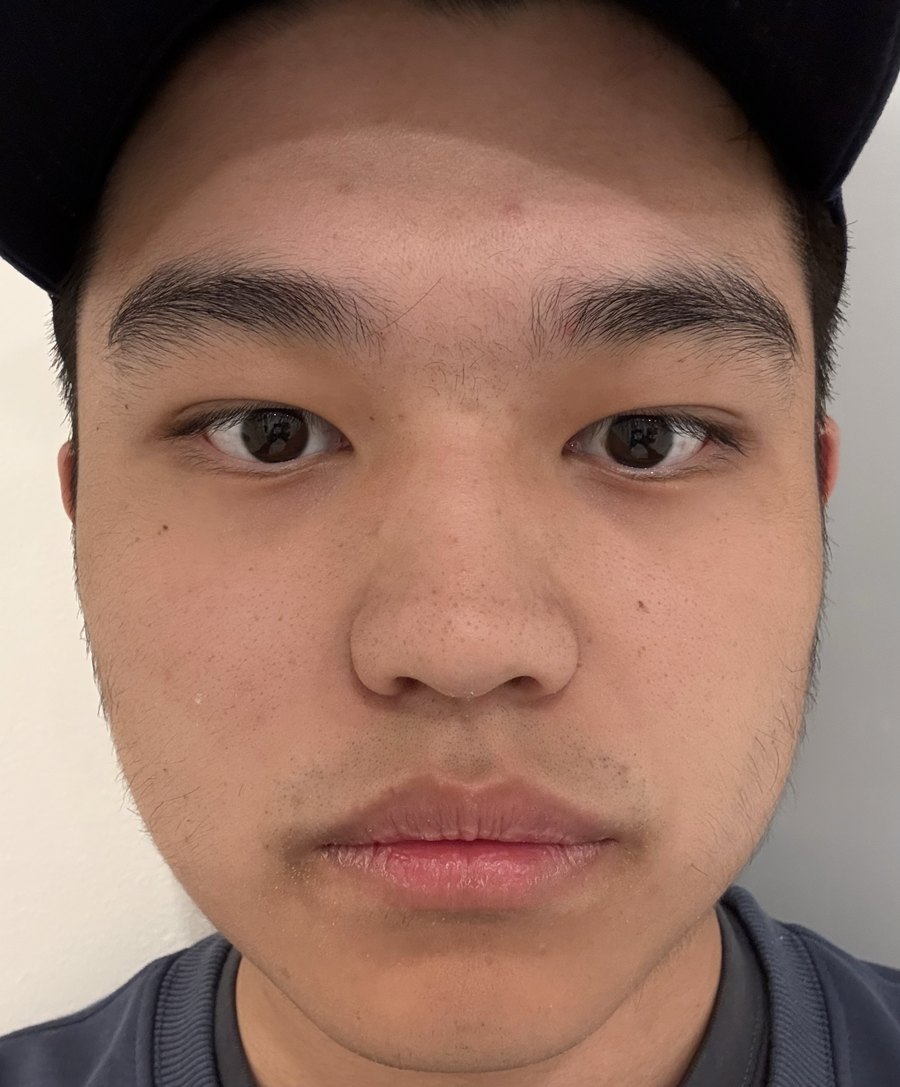
The same face, the same phone, the same lighting, and roughly the same head size in the frame. The only thing that changed is how far the camera was from my nose.

Close-up selfie taken at arm's length, showing perspective distortion

click the photo to flip
Shot A — close, no zoom B — far, zoomed in
Camera iPhone 16 Pro iPhone 16 Pro
Subject distance ≈ 0.25–0.30 m ≈ 2 m
Lens / framing main camera, 1×, then cropped so the head matches B telephoto, ≈ 2×
Head height in frame matched matched

Distances are paced estimates, not measured. Framing was matched by cropping A, which is why its pixel dimensions differ.

Why the second one looks like me and the first one doesn’t

A pinhole camera puts a point of height h at depth d onto the sensor at height f·h/d. The important part is the division by d: the image of a three-dimensional object is not a uniform scaling of it, it is a scaling that gets weaker the further away a feature is. So the ratio of depths across the face is what decides its rendered shape.

nose at depth d, ear at depth d + Δ, with Δ ≈ 0.10 m
relative magnification of nose over ear  =  (d + Δ) / d

A   d = 0.25 m  →  0.35 / 0.25  =  1.40×   the nose is rendered 40 % larger than it should be
B   d = 2.00 m  →  2.10 / 2.00  =  1.05×   within 5 % of a flat, orthographic projection

That single number explains everything visible in shot A. The nose, lips and the front of the cheeks are the closest points, so they are magnified most; the ears are the furthest, so they are magnified least and disappear behind the cheekbones entirely. The face reads as if it were pushed outward from the middle, because geometrically it was.

In shot B the whole head sits inside a 5 % depth window, so every feature is scaled by almost the same factor. The projection is close to orthographic and the proportions survive.

The lens did not do this — the distance did. Zooming in does not change the shape of anything; it only changes which part of the same ray bundle lands on the sensor. What the zoom bought me in shot B is permission to stand two metres away while still filling the frame with a head. This is the whole reason portrait photographers reach for 85–135 mm lenses: not because long lenses are flattering, but because they let you back up until the face is depth-flat, and then crop back in.

Part 2

Perspective compression on a building

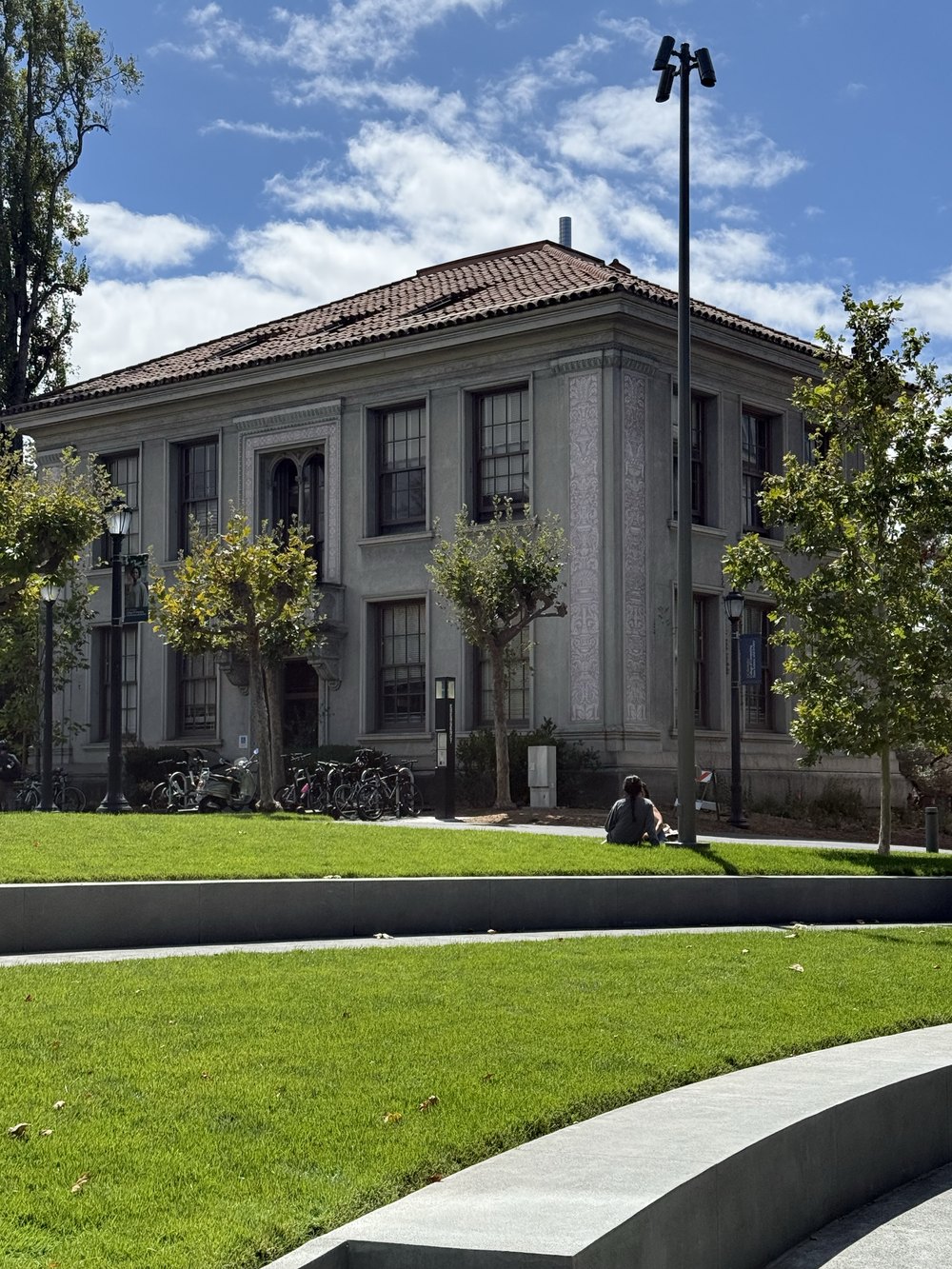
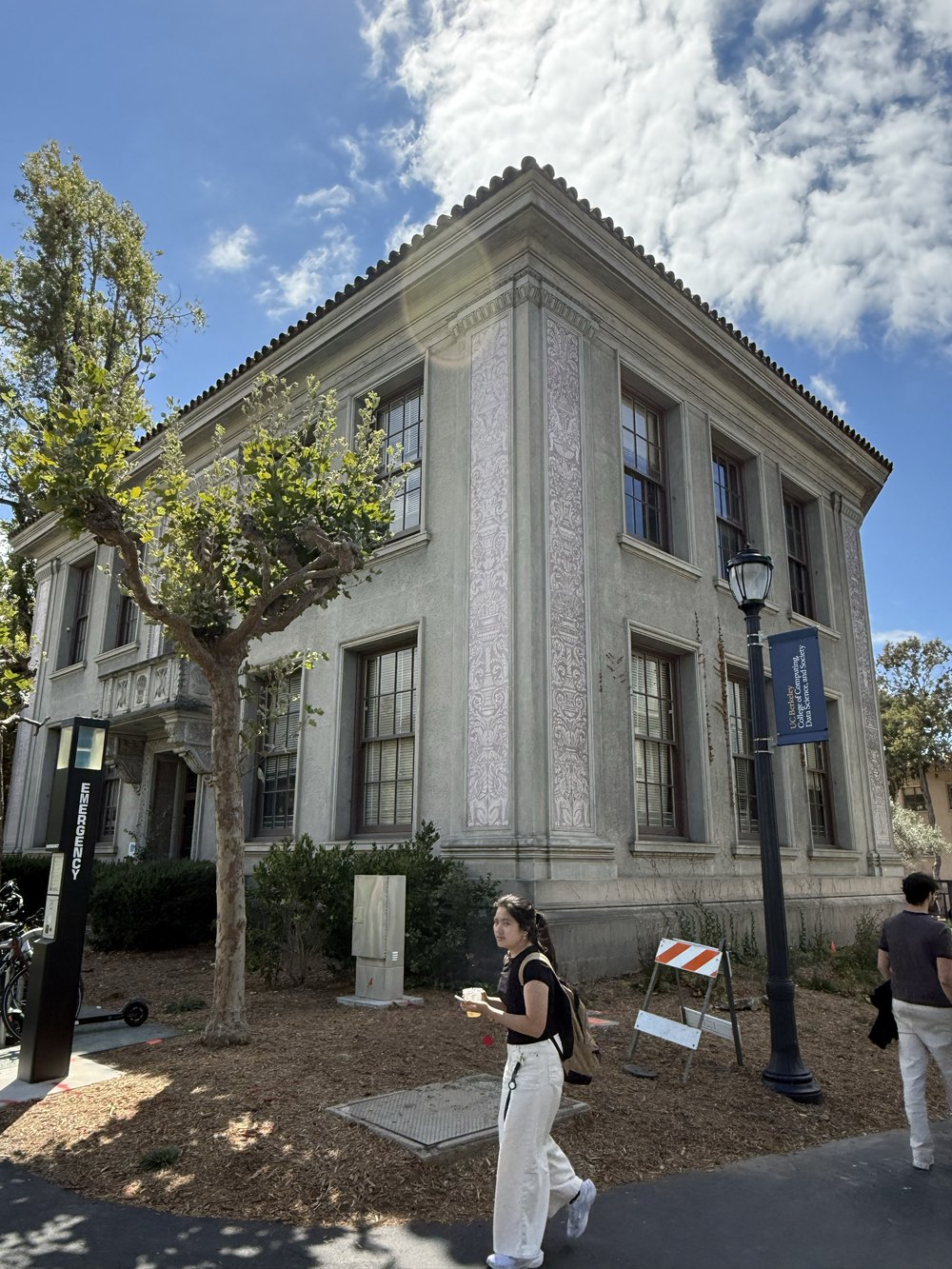
The same corner of the same building, framed to about the same size, from two very different standing positions. What changes is not the size of the building — it is the shape of the space around it.

Telephoto view of the building
A · far + zoomCompressed. Depth differences across the scene are small compared to the shooting distance.
Wide-angle view of the building from close up
B · close, wideExpanded. Depth differences are a large fraction of the shooting distance.

The same arithmetic as the selfie, on a bigger object

The building has two faces meeting at a corner. Call the near corner depth d and the far end of the receding wall d + Δ, where Δ is fixed by the building itself (roughly its length, maybe 15 m) and has nothing to do with where I stand. Everything follows from the ratio again:

A   standing ≈ 45 m out  →  (45 + 15) / 45  =  1.33×
B   standing ≈ 6 m out   →  (6 + 15) / 6   =  3.50×
distances are estimates; the point is the ratio, which changes by nearly 3×

In A the far end of the wall is only 33 % smaller than the near corner, so the wall hardly tapers, the roofline is nearly horizontal, and the two façades keep similar widths. Layers of the scene that are genuinely far apart — the foreground trees, the wall, the sky — arrive at nearly the same magnification and therefore look glued together. That is perspective compression: it is not the telephoto lens flattening anything, it is the long shooting distance making all depth ratios approach 1.

In B I walked in until the near corner was a few metres away. Now the far end of the wall is 3.5× smaller than the near corner, so the wall visibly rushes to its vanishing point, the cornice dives down to the right, and the vertical edges splay because the camera is tilted up and no longer far enough away for the projection to be locally orthographic. The near corner dominates the frame the way the nose dominated shot A in Part 1.

Parts 1 and 2 are the same experiment at two scales, and both land on the same rule: perspective is a property of where the camera is, not of the lens on it. Focal length only decides how much of that fixed projection you keep.

Part 3

The dolly zoom, rebuilt from two photographs

Hitchcock's Vertigo shot: pull the camera back while zooming in, exactly fast enough that the subject stays the same size. The subject is nailed to the frame while the world behind it changes shape — a live demonstration of everything Parts 1 and 2 argued.

What I shot, and why it isn’t a filmstrip

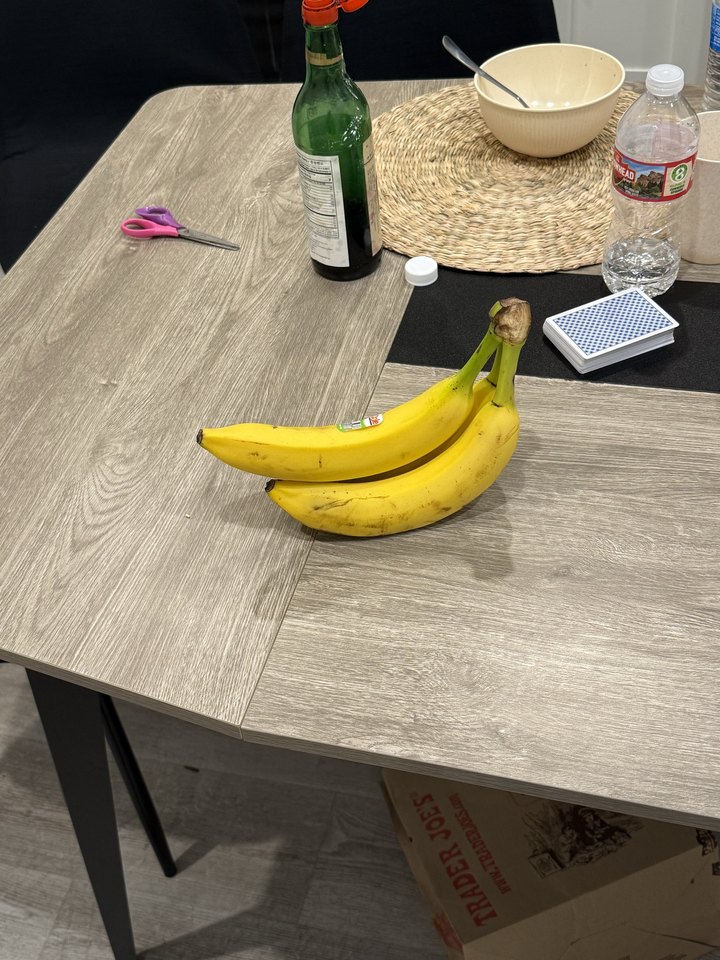
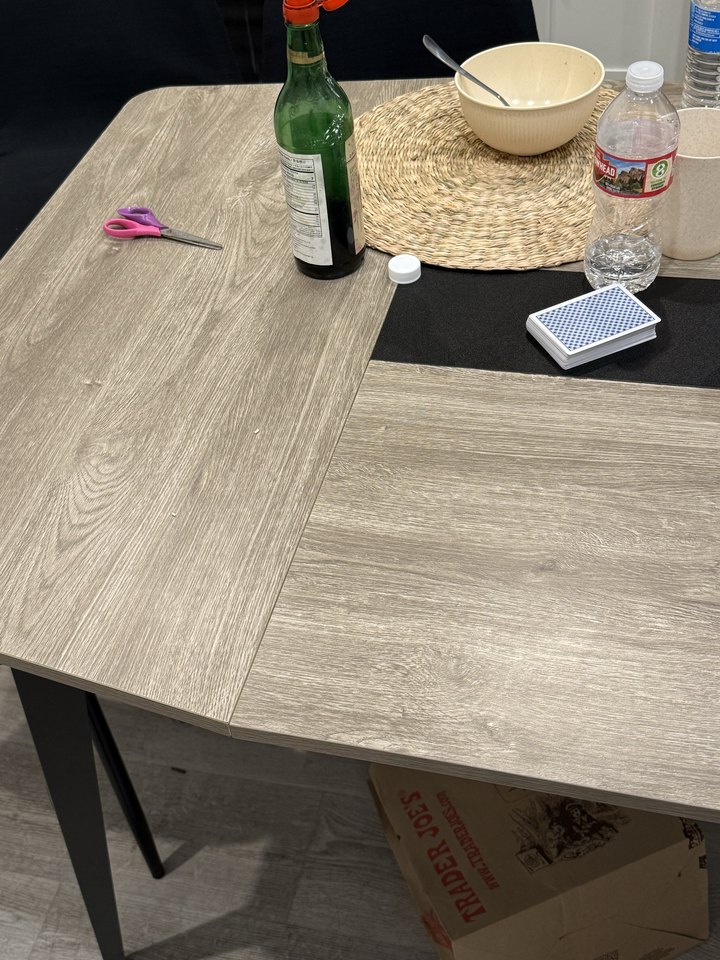
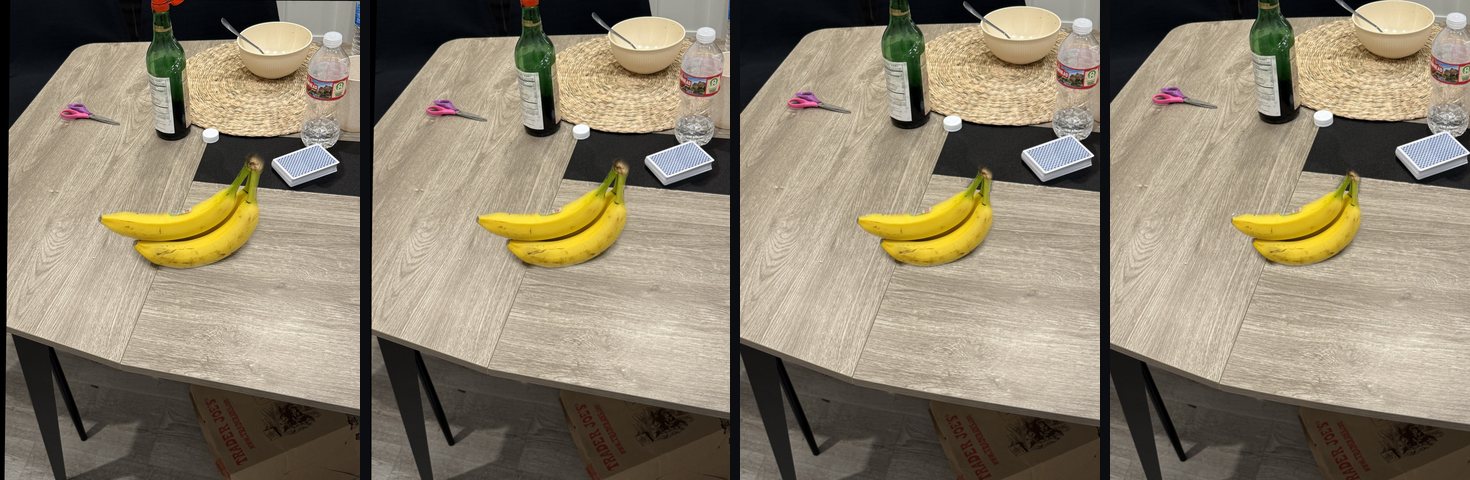
Doing this by hand needs the subject to stay registered to within a few pixels across every frame while both the tripod and the focal length move. Instead I shot a matched pair on a tripod-still phone — one frame with the subject on the table, one clean plate of the same scene with the subject removed — and then synthesised the entire sweep in code. Every intermediate frame you see below was computed, not photographed.

I want to be straightforward about the trade-off: this is a reconstruction of a dolly zoom rather than a physically executed one, and its depth model is a smooth radial approximation rather than a measured depth map. What it buys is a continuous, controllable sweep instead of eight discrete stills — which is what makes the slider below possible.

Photograph of two bananas on a table
Input 1 · subject frameThe bananas in place. This frame supplies the foreground.
Photograph of the same table with the bananas removed
Input 2 · clean plateSame scene, subject removed, camera nudged slightly — which is exactly why it has to be aligned first.

Result

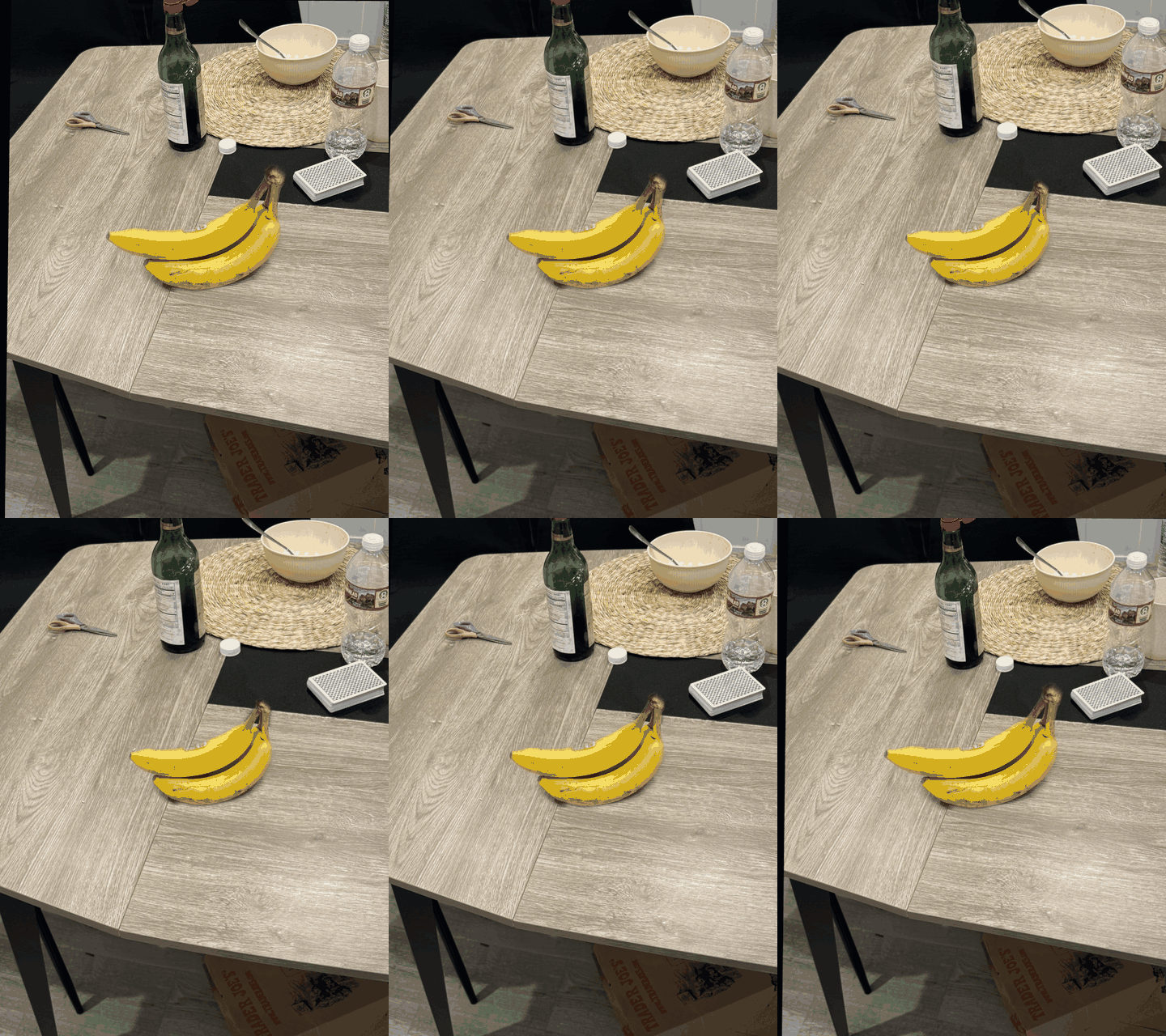
Animated dolly zoom: the bananas hold their size while the table and background rush in
The Vertigo shot24 synthesised frames, looping. Watch the bottle, the bowl and the far table edge; then watch the bananas, which barely move.
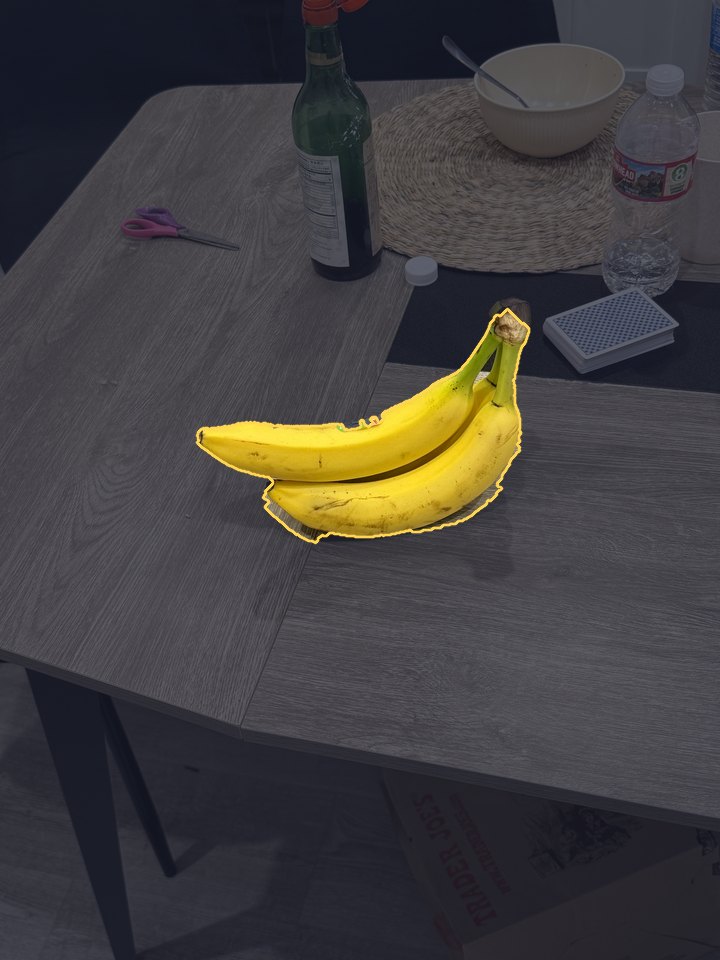
The recovered subject matte drawn over the original photograph
The recovered matte. Everything outside it is treated as background and gets the full field-of-view warp.

Interactive lab — drive the dolly yourself

rendered live in JavaScript · no video, no pre-baked frames
building the scene…
Dolly position 0.00
close · widefar · long
Zoom range ×1.35
subtleseasick
Mode
Field of view60.0°
Focal length×1.00
Camera distance×1.00 back
Render—

How to play with it

  1. Drag the dolly slider slowly. Keep your eyes on the two bananas — they hold their size and position. Now look past them at the green bottle, the bowl and the far edge of the table: they shrink and pull away as if the room were getting longer. That contradiction is the whole effect.
  2. Hit Play sweep (or press Space, or click the image) to run the move back and forth continuously. This is what the GIF above shows, generated live.
  3. Switch to Plain zoom and drag again. Now the camera stays put and only the lens changes, so everything grows together — the bananas included. Flipping between the two modes at the same slider position isolates exactly what the dolly move contributes.
  4. Push Zoom range up. At ×1.05 the effect is a subtle unease; past ×1.6 the background visibly detaches from the subject. The readout shows the field of view narrowing from 60° as the virtual camera walks backwards by the same factor the lens lengthens.
  5. Tick Outline the subject matte to draw the boundary the segmentation found. It shows you exactly where the renderer stops treating pixels as background — and where the artefacts of an imperfect matte come from.
  6. Watch the render time. Every frame is a full per-pixel inverse warp of both layers, recomputed from scratch in JavaScript as you drag.

The geometry the renderer implements

A subject of height h at distance d covers f·h/d on the sensor. Holding the subject the same size therefore means holding f/d constant: if the camera retreats by a factor s, the focal length must grow by the same s. The background does not cooperate, because its extra depth Δ does not scale:

subject   f₀s · h / (d₀s)  =  f₀h / d₀   constant — this is the lock
background   f₀s · h / (d₀s + Δ)   increases with s — this is the rush

θ(t)  =  θ₀ + (θ₁ − θ₀)·smoothstep(t),    θ₁ = 2·atan( tan(θ₀/2) / Z )
s(t)  =  tan(θ₀/2) / tan(θ(t)/2)    with θ₀ = 60°, Z = zoom range

With a single photograph there is no Δ per pixel, so I approximate the scene's depth structure with a smooth radial profile: pixels near the locked centre are treated as near the subject's depth and are scaled least, pixels out towards the frame edge are treated as further and are scaled most. The background scale field is 1 + 0.65·(s−1)·(0.25 + 0.75·exp(−(r/0.68R)²)), and the subject gets a small counter-contraction 1 + 0.06t − 0.35t·(r/r_obj)^1.35 so its silhouette stays put while its own internal perspective changes very slightly. Both fields are radial, which is the fact the JavaScript port exploits.

Pipeline

  1. Difference-of-Gaussian keypoints

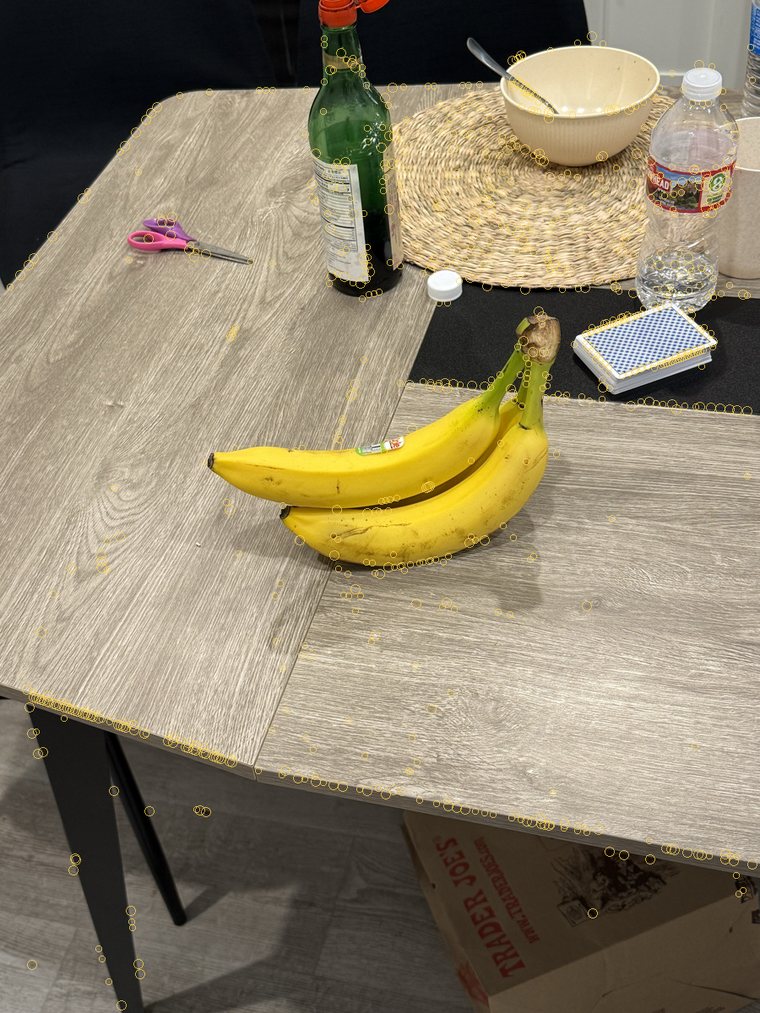
    Five Gaussian blurs of the grayscale image, σ = 1.6 with k = 21/3, differenced into a four-level DoG stack. Non-maximum suppression over 3×3×3 neighbourhoods with a |D| threshold of 0.015 gives 842 keypoints. keypoints.py: build_dog_space, find_local_extrema

  2. Patch descriptors

    A 9×9 window of the DoG level around each keypoint, flattened to 81 numbers, mean-subtracted and divided by its standard deviation — cheap invariance to brightness and contrast. keypoints.py: extract_descriptors

  3. Ratio-test matching

    Euclidean distances between every pair of descriptors; a match is kept only if the best is closer than 0.8× the second best, so ambiguous wood-grain texture is rejected. 373 candidate matches survive. extractor.py: match_features

  4. Homography by normalised DLT inside RANSAC

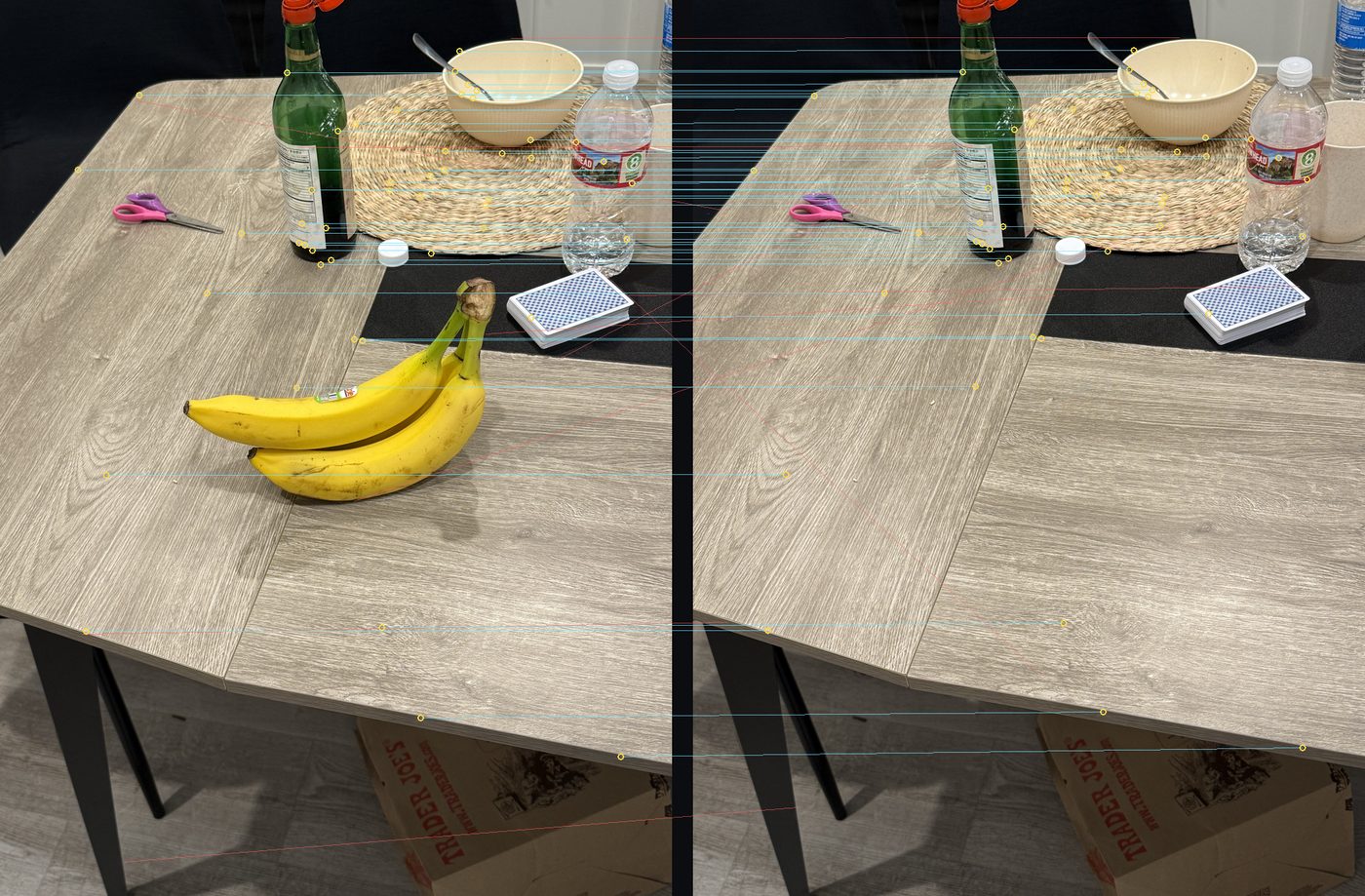
    3000 iterations, four random correspondences each, Hartley-normalised DLT solved by SVD, 3.5 px inlier threshold, then a re-fit on all inliers followed by three refinement rounds. 239 inliers. extractor.py: solve_homography, estimate_homography_ransac

  5. Warp the plate into the subject's frame

    The estimated homography is inverted, normalised, and handed to a perspective resample so the two exposures share one coordinate system. main.py: warp_to_reference

  6. Segment the subject

    Chroma seeds (a yellow test in RGB plus a saturation floor, intersected with the difference against the aligned plate), connected components to drop specks, then geodesic region growth constrained to a dilated band around the seed, hole filling, and a feathered alpha. main.py: foreground_mask

  7. Radial field-of-view warp and composite

    Inverse-mapped radial resample of the plate and of the premultiplied subject with their two different scale fields, blended by the warped alpha. main.py: radial_warp, make_frames

Evidence

Detected DoG keypoints drawn as circles over the subject photograph
All 842 surviving DoG extrema on the subject frame; circle size follows the scale level at which the extremum was found. Note how they cluster on the table's edges, the bottle label and the card box — and how sparse they are on flat wood.
Inlier correspondences drawn between the two photographs
A sample of the RANSAC inliers (cyan) with a handful of rejected matches (red) for contrast. The inliers are consistently near-horizontal and near-parallel, which is exactly what a small camera translation between two shots should produce.

Porting the renderer to the browser

A direct transliteration of radial_warp would evaluate a square root, a division and two profile functions per pixel per frame, which is far too slow to drag. The saving grace is that every scale field in the renderer is a function of the radius and nothing else. The inverse warp needs r_src = r / s(r), so the whole per-pixel geometry collapses into a one-dimensional lookup table rebuilt once per frame — a few thousand entries instead of seven hundred thousand transcendental evaluations.

Two further things earn their keep. Compositing in premultiplied alpha means the warped foreground and the warped alpha go straight into bg·(1−α) + fg with no divide-then-multiply round trip. And because the subject only ever contracts towards the locked centre, the foreground fetch is skipped entirely outside the matte's bounding box, which is most of the frame. The result is a full inverse warp of both layers, per pixel, at interactive rates — the render time is printed in the panel.

Porting the rest of it too

The renderer alone still needed my Python to have run first, because it starts from three precomputed tensors. So pipeline.js ports everything upstream of it as well — all seven stages above — and the panel below the lab runs them on a pair of photographs you supply. Nothing is uploaded: the files never leave the browser.

Reproducing NumPy and SciPy honestly is most of the work. scipy.ndimage's Gaussian is matched exactly, down to its truncate=4.0 kernel radius and its reflecting boundary. Its binary morphology defaults to a 4-connected cross rather than a 3×3 square, so this does too, and binary_propagation becomes a breadth-first flood inside the permitted region. The one place I deliberately diverge is binary_dilation(seed, iterations=14): a cross dilated fourteen times reaches exactly the pixels within city-block distance fourteen, so a two-pass chamfer distance transform gives the identical result for a fraction of the work.

The linear algebra needed replacing outright, since there is no numpy.linalg in a browser. The normalised DLT wants the null vector of a 2N×9 design matrix; rather than pull in a library, the solver runs a one-sided Jacobi SVD — rotate pairs of columns until they are mutually orthogonal, and the shortest resulting column is the smallest singular value with the accumulated rotations as its singular vector. It is about thirty lines, it is numerically well behaved on Hartley-normalised coordinates, and it is fast enough to run inside all three thousand RANSAC iterations.

One more shortcut is worth naming because it changes the arithmetic. The descriptors are mean-subtracted and divided by their standard deviation, so every one of them satisfies ‖v‖² = 81 exactly. That makes ‖a−b‖² = 162 − 2a·b, so the entire matching stage reduces to a dot product per pair — the Euclidean distances the ratio test needs are recovered exactly from it, at roughly half the cost.

Run against the two photographs at the top of this section, the browser finds 878 and 790 keypoints, keeps 394 matches and accepts 253 of them as inliers; the Python finds 842 and keeps 373 with 239 inliers. The small gap is resampling, not arithmetic — Pillow's Lanczos reduction and the canvas's own high-quality downscale disagree by a fraction of a level near the detector threshold, which tips a few dozen borderline extrema in or out. The inlier rate is the same to within a percentage point, and so is the recovered homography.

Code

  • keypoints.py DoG scale space, extrema detection, normalised patch descriptors
  • extractor.py ratio matching, normalised DLT homography, RANSAC and refinement
  • main.py alignment, matting, the radial dolly-zoom renderer, GIF output
  • export_web.py builds every figure and asset on this page
  • docs/pipeline.js the JavaScript port of the detection, matching, alignment and matting stages
  • docs/dolly-lab.js the JavaScript port of the renderer, and the interface for both panels
Statement

Use of AI on this project

A plain account of who wrote what, so the line between my work and the assistant's is legible.

Mine

  • All six photographs, and the choice of subjects, distances and framings.
  • The entire Python program. I designed and wrote keypoints.py (DoG scale space, 3×3×3 extrema, normalised patch descriptors), extractor.py (ratio-test matching, normalised DLT, RANSAC with inlier refinement) and main.py (alignment, the segmentation heuristic, the radial field-of-view warp, premultiplied compositing, GIF output).
  • The physics and the model. Deriving the dolly-zoom constraint, choosing to approximate scene depth with a radial profile, and tuning the profile parameters.
  • The algorithms the JavaScript reimplements. Every stage the browser runs is a port of code I wrote; the assistant translated it, and I checked the translation against the Python's own numbers on the same pair of photographs.
  • The writing on this page — the explanations, the numbers and the conclusions are my own reasoning about my own images.

Claude (Claude Code)

  • Debugging. Most usefully, it caught that warp_to_reference was passing a 3×3 homography to PIL's Image.Transform.AFFINE, which silently reads only the first two rows and discards the projective terms. It now uses PERSPECTIVE with a properly normalised inverse.
  • The JavaScript port of the renderer. Translating make_frames and radial_warp into docs/dolly-lab.js, including the radius-only lookup-table reformulation, the bounding-box skip and the box-blur approximation of the Gaussian feather.
  • The JavaScript port of the pipeline. Translating keypoints.py, extractor.py and the alignment and matting halves of main.py into docs/pipeline.js — including the stand-ins for the NumPy and SciPy routines that have no browser equivalent: the one-sided Jacobi SVD behind the DLT, the 4-connected morphology, the chamfer distance transform standing in for the fourteen-iteration dilation, and the dot-product form of the descriptor distance.
  • HTML and CSS. The layout, typography and print stylesheet of this page.
  • Figure plumbing. export_web.py, which renders the keypoint, match, matte and filmstrip figures and packages the web assets.

I checked every change against my own code before keeping it, and I can explain any line in the repository. Nothing in the computer-vision pipeline was generated for me.